
I. Pre-Startup Preparations
1. Environmental Inspection:
Verify that the working environment temperature is between 5°C and 40°C, and that the humidity does not exceed 80%. This prevents damage to internal electronic components or degradation of optical path performance caused by unsuitable environmental temperature and humidity levels. 1.2. Check that no debris or obstructions are accumulated around the equipment; maintain a safety clearance of at least 1.5 meters to facilitate personnel evacuation and equipment maintenance in emergency situations.
2. Equipment Exterior Inspection:
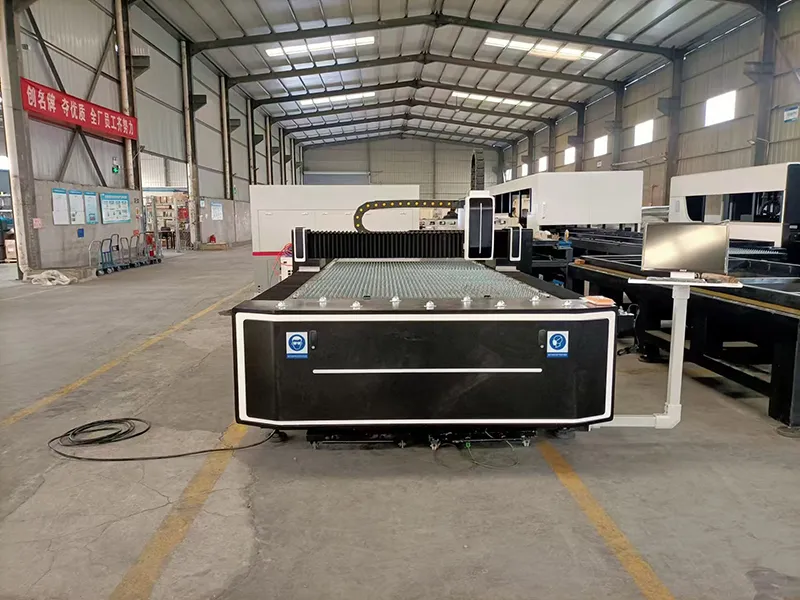
Visually inspect the fiber laser cutting machine for any visible signs of collision, deformation, or damage. Verify that all component connections are secure—particularly critical parts such as the laser head, guide rails, and transmission components.
Inspect the equipment's cables, air lines, water lines, and other conduits for any signs of breakage, aging, or kinking. This prevents safety hazards—such as electrical leakage, gas leaks, or water leaks—that could arise from conduit-related issues.
3. Auxiliary System Inspection:
Cooling System Inspection: Confirm that the water level in the cooling tank falls within the normal scale range (typically around 2/3 of the tank's capacity). The cooling fluid used must be a specialized coolant designed for laser cutting, and it should be replaced periodically (a replacement interval of every 3 to 6 months is recommended). Additionally, verify that the cooling water pump is operating normally and check for any blockages or leaks in the piping. Clean the filter screen once a week to prevent dust accumulation from clogging the heat dissipation vents and impairing the motor's cooling efficiency.
Gas Supply System Inspection: Ensure that the gas supply pressure remains stable and falls within the range specified by the equipment requirements (e.g., Oxygen pressure: 0.6–0.8 MPa; Nitrogen pressure: ...). (0.8–1.2 MPa); verify that the gas lines are leak-free, the gas cylinder valves open and function normally, and the type of gas corresponds to the requirements of the specific cutting process.
Inspect the smoke extraction and dust removal system: Confirm that the smoke extraction ducts are securely connected and that the dust removal equipment filters are clean and free of blockages. If excessive dust has accumulated on the filter elements, they must be cleaned or replaced immediately to ensure effective smoke extraction and maintain air quality within the work environment.
4. Inspection of Key Components:
Inspect the nozzle: Check if the orifice is distorted (out of round), if there are any foreign objects on the surface, or if the nozzle is loose. If the orifice is distorted or the edges show signs of wear, the nozzle must be replaced immediately to prevent any adverse effects on cutting performance.
Inspect the protective lens: Check for any dark spots or blemishes on the lens; if present, replace it with a new one immediately. If the lens is fogged with condensation, wipe it clean using alcohol. Note: After removing the protective lens tray, you must immediately seal the mounting port on the cutting head as well as the orifice located beneath the nozzle. When cleaning the protective lens, ensure that the surrounding area is free of significant dust particles and perform the cleaning in a draft-free environment.
Check for optical path alignment (Centering): Procedure—Affix a piece of transparent adhesive tape to the copper nozzle located beneath the cutting head. Press the "Pulse" (or "Test Fire") button, then remove the tape to observe whether the laser beam struck the exact center of the tape. If it did not, the optical path must be adjusted until it is centered.
Upon powering on the machine each day, the laser head must undergo a calibration procedure (including "Floating Head Calibration" and "Auto-Adjustment"). The calibration results must indicate a status of "Excellent."
For materials of different thicknesses, nozzles with corresponding orifice diameters must be used. Whenever a nozzle is replaced, a re-calibration or re-setup procedure is required. Calibrate the laser head.
II. Startup Procedure
1. Power On:
First, switch on the main power supply. Wait for the equipment's control system to complete its self-diagnostic check; during this process, the various indicator lights will flash sequentially. If any abnormal alarm prompts appear, immediately shut down the equipment to inspect and resolve the fault before resuming operations.
Start the auxiliary systems: sequentially activate the cooling system, gas supply system, and smoke extraction/dust removal system. Observe the status indicators for each system to ensure they are illuminated normally, and use the gauges or display screen to verify that parameters—such as cooling water temperature and gas pressure—meet the equipment's operational requirements.
2. Log In to the Control System:
Enter the correct username and password on the equipment's control panel or control computer to log in to the control system. The use of unauthorized accounts for logging in is strictly prohibited to prevent equipment damage or data loss resulting from improper operation.
Return-to-Zero Operation: After logging in, execute the machine's "Return-to-Zero" operation. This moves the laser head, worktable, and other moving components back to the zero-point position within the equipment's coordinate system, thereby ensuring the precision and accuracy of subsequent processing tasks. During the return-to-zero process, carefully observe the moving components to ensure they operate smoothly, without any abnormal noises or signs of jamming. Before returning to the home position, ensure that the surface of the worktable is free of debris to prevent collisions with the laser head. The return-to-zero process includes: (1) a one-touch automatic return-to-zero for the X, Y, and Z axes; and (2) a separate, manual return-to-zero operation for the auto-focus axis.
Equipment Warm-up: After powering on, allow the equipment to run in an idle (no-load) state for a brief period. Perform a 5–10 minute warm-up to allow components such as the laser, guide rails, and lead screws to reach a stable operating state; this minimizes errors caused by temperature fluctuations and improves processing quality.
III. Troubleshooting Simple Faults:
Touch-Sensor Alarm:
Software display indicates: "Body capacitance decreased," "Touch-sensor alarm," or "Capacitance abnormally increased." Check if the nozzle is loose, then calibrate the laser head.
Burrs on Cut Edges:
Burrs appear on one side of the cut material while the other side remains smooth. Check if the laser beam path is centered within the nozzle.
Upward-Streaming Sparks During Cutting:
Check the following: Is the nozzle loose? Is the nozzle worn? Is the nozzle's light-exit aperture a perfect circle? Is the gas pressure normal?
Laser Not Emitting Light:
Check the following: Is the water tank temperature normal (approx. 26°C)? Is the water tank displaying any alarms? Is the laser unit displaying any alarms?
Burrs at the End of the Cut (None at the Start):
When cutting relatively long lines, the beginning is smooth but the end has burrs or fails to cut through completely. Check the following: Is the nozzle overheating? Does the protective lens have any black spots?
Burrs on Both Sides of the Cut:
Check the following parameters: Cutting gas pressure, focal position, nozzle height, and cutting speed.
IV. Cutting Tips and Best Practices:
1. Changing Nozzles for Different Material Thicknesses:
For material thicknesses of ≤ 2 mm, a 1.5 mm single-layer nozzle is recommended; adjust the focal position within the range of 0 to -2. For material thicknesses of 3–5 mm, a 2–4 mm single-layer nozzle is recommended; adjust the focal position within the range of 0 to -5.
2. How to Address Burrs Discovered During Cutting:
When using a fiber laser cutter with air or nitrogen assist gas, a "negative focus" setting is typically used for cutting (adjustment range: 0 to -10). Provided the material is being cut through completely, a faster cutting speed generally results in fewer burrs, while a slower speed tends to produce more burrs. Since the maximum pressure from a standard air compressor typically reaches only 1.3–1.5 MPa, cutting materials thicker than 3 mm may result in slight burrs on the underside of the material; the thicker the material, the more pronounced the burrs will be. (Note: For materials thicker than 3 mm, consider using a higher-pressure assist gas like nitrogen for cleaner cuts.) The aforementioned plates are cut using oxygen.
3. What is the gas pressure for oxygen cutting?
During oxygen cutting, the focus is set to positive focus (on-focus) cutting, with an adjustment range of 0 to +10. Oxygen is primarily used for cutting thick plates. The gas pressure adjustment range is 0.2 to 0.9 MPa.
4. Does the focal point displayed on the monitor (software) correspond to the actual focal point during cutting?
During the cutting process, it is essential to verify whether the focal point set in the software aligns with the focal point displayed on the laser head itself. Any discrepancy will significantly compromise the cutting quality and require immediate adjustment.